Kanboard is a free, open-source, self-hosted project management tool based on the kanban board method. It gives teams tasks, columns, swimlanes, subtasks and time tracking in a clear visual workflow. It suits small teams that want simple project management without paying a monthly subscription, provided they are comfortable with self-hosting.
What is Kanboard?
Kanboard is a web-based project management application designed around the kanban method. Work is represented by task cards, which move through columns such as “To do”, “In progress” and “Done”. This gives a team an immediate view of what needs attention and where work may be getting stuck.
The software is deliberately simple. It does not try to combine every possible business tool into one large platform. Instead, it focuses on visual task management, workflow control and practical collaboration. The official Kanboard website describes it as free, open-source and self-hosted.
That self-hosted model is important. You install the application on compatible web hosting or a server that you control. In return, there is no per-user subscription for the core software. As of 2026, your main costs are hosting, setup and ongoing maintenance rather than Kanboard licence fees.
5 Best Features of Kanboard
-
Clear visual kanban boards
The main board makes project status easy to understand. Team members can see which tasks are waiting, being worked on or complete, then move cards between columns as work progresses. This works particularly well for marketing tasks, website updates, internal projects and recurring operational work.

-
Swimlanes and work-in-progress limits
Swimlanes let you organise work into horizontal sections. You might use them for different clients, departments, priorities or project streams. Work-in-progress limits can also help prevent a team from starting too many tasks at once.
This is a useful feature for small teams where the same people handle sales, delivery, administration and customer support. If one column contains more active tasks than the agreed limit, it becomes easier to spot a bottleneck and decide what should be finished first.
-
Tasks, subtasks and time estimates
A task can include a description, assignee, due date, comments, attachments, category and tags. Subtasks allow a larger piece of work to be divided into smaller actions, such as planning, drafting, checking and publishing.
You can also record estimates for time or complexity. Basic time tracking helps compare planned effort with time spent. It will not replace a specialist timesheet or billing system for every business, but it can give a small team a more realistic view of project workload.
-
Search, filtering and Markdown notes
Kanboard includes search and filtering tools for finding tasks by criteria such as assignee, due date, category or description. This becomes increasingly valuable once a team has several active projects.
Task descriptions and comments support Markdown, so users can create structured notes without relying on a complicated editor. A clear task template might include the objective, required files, owner, deadline and definition of completion.
-
Automation and extensibility
Automatic actions can reduce repetitive administration. For example, a task may be assigned automatically when it moves into a particular column, or its category may change when a workflow event occurs.
The plugin system provides another way to extend the application. Depending on your requirements and technical confidence, plugins may add integrations, reporting options, alternative views or additional workflow controls. Community extensions should be checked for compatibility and ongoing maintenance before being used in a critical process.
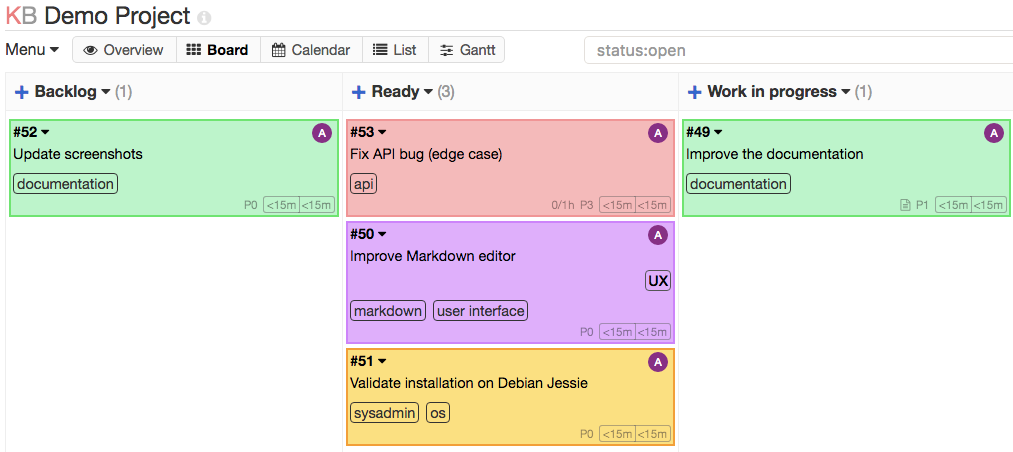

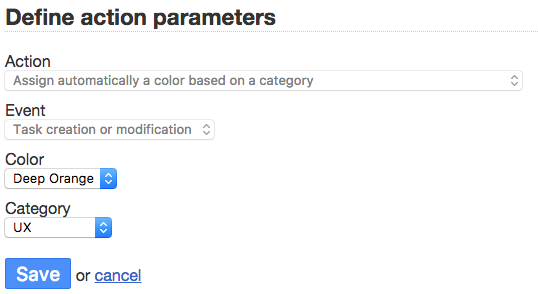
Kanboard in Action: 3 Examples
1. Managing website work
Example scenario: A small business is planning a website refresh. Its board contains columns for ideas, content needed, design, development, review and completed work. Each page is represented by a task, with subtasks for copy, images, search engine optimisation and approval.
The business can see which pages are ready for review and which are waiting for information. For businesses that need broader help with planning or delivery, Zest City’s website design services can support the public-facing website alongside the internal workflow.
2. Coordinating marketing campaigns
Example scenario: A small marketing team is preparing a campaign for a webinar or product launch. Swimlanes separate email, social media, landing page and follow-up tasks. Each card includes an owner and deadline, while comments keep decisions in one place.
This approach reduces the risk of a campaign task being discussed in one channel, approved in another and forgotten in a spreadsheet. It also gives the team a straightforward record of what has been completed.
3. Handling internal service requests
Example scenario: A growing business uses a board for website and IT requests. Employees submit tasks for access changes, content updates, broken links or document amendments. A team member assigns each request, adds a priority and moves it through investigation, action and closure.
This is not a replacement for a sophisticated service desk in every organisation. However, it can provide a simple shared queue when the business needs visibility without introducing a large, expensive platform.
3 Things That Could Be Better
-
The interface is functional rather than polished
The minimalist design is part of the product’s appeal, but it may feel dated compared with modern subscription-based project management platforms. Users looking for highly visual dashboards, extensive drag-and-drop customisation or a refined mobile experience may find it limited.
-
Self-hosting creates responsibility
Free software is not the same as zero administration. Someone must select suitable hosting, manage access, apply updates, monitor backups and consider security. Zest City Web Hosting can make installation easier, but your organisation should still decide who owns administration and data protection tasks.
-
Advanced collaboration may require extra work
Kanboard covers the core workflow well, but some teams may want built-in document collaboration, detailed portfolio reporting, extensive native integrations or advanced resource planning. Plugins can help, although each additional extension introduces another compatibility and maintenance decision.
Top 2 Alternatives to Kanboard
-
dotProject: Also available in Zest City’s 79-app library in the Project Management category, dotProject is more focused on structured project planning, milestones and task dependencies. It may suit users who prefer a traditional project-management layout over a purely kanban-led workflow.
-
Feng Office: Feng Office combines project management with broader collaboration and business organisation features. It may be a better option for teams that want more document, contact and workspace functionality alongside task tracking.
The right choice depends on how your team works. Kanboard is strongest when a simple visual workflow is the priority. The alternatives may be more appropriate when you need a wider business-management environment.
3 Tips to Get More From Kanboard
-
Design the workflow before creating lots of tasks
Start with five or six useful columns. For example: Backlog, Ready, In progress, Review, Blocked and Done. Avoid creating a column for every minor step, as this can make the board harder to read.
-
Set a clear definition of “done”
Add a short checklist to recurring task types. A website content task might not be complete until the copy is approved, links are checked, images have suitable alternative text and the page has been reviewed on mobile.
-
Review blocked and ageing tasks each week
Use filters to find overdue or inactive work. Ask what is preventing progress, whether the task still matters and whether it should be split into smaller actions. This keeps the board useful instead of allowing it to become a storage area for forgotten tasks.
Free with Zest City Web Hosting
Kanboard is one of 79 apps available free with Zest City Web Hosting : included on every shared hosting programme and platform we offer, with genuine 1-click installation (no server admin, no manual setup, live in minutes). No extra licence fees, no separate app-store account.
With Zest City Web Hosting, the application can sit alongside your business website and other online services. The installation process is handled through the hosting platform, making it more accessible to site owners who do not want to configure a server manually.
Hosting still matters even when the application itself is free. Choose a provider that can help with account access, backups, performance questions and the wider website environment. Zest City Web Hosting is part of a broader digital media service, so support can extend beyond installing an application.
FAQs
Is Kanboard free?
Yes. The core Kanboard software is free and open source under the MIT licence. You still need suitable hosting and may have administration or support costs, but there is no core per-user software subscription.
Is Kanboard good for small teams?
Yes, particularly for small teams that want a straightforward visual workflow. It is less suitable for organisations that need extensive built-in collaboration, portfolio management or enterprise reporting without additional configuration.
Does Kanboard support time tracking?
Yes. It supports time estimates and basic time tracking for tasks and subtasks. Teams with complex billing, payroll or resource-management requirements may need a separate system or carefully selected extension.
What is Kanboard used for?
Kanboard is used to organise tasks and projects through visual workflow columns. Common uses include website work, marketing campaigns, content production, internal requests and client delivery processes.
Not sure Kanboard is the right fit : or want to see the other 78 apps you get free? Talk to Zest City about your web hosting and we'll help you pick the right app, the right hosting plan, and show you what else we can do for your site, from design to ongoing support.
- SEO title: Kanboard Review 2026 | Free 1-Click Install with Zest City
- Meta description: Kanboard review: see features, pricing and limitations, plus free Zest City Web Hosting one-click installation for small teams.
- Primary focus keyphrase: Kanboard review 2026
- Secondary keyphrases:
- free Kanban project management tool
- self-hosted project management software
- Kanboard one-click install
- free project management apps
- Zest City Web Hosting
- Suggested internal page links:
- https://zestcity.com/website-hosting-services/ : Zest City Web Hosting
- https://zestcity.com/website-design-services/ : website design services